
Monthly
$99/mo
- Square POS sync & sales import
- Unlimited menu items, recipes, modifiers
- Real-time food cost & per-item margin
- P&L by location
- AI recipe & modifier suggestions
- Cancel anytime
PlateMargin pulls your Square sales, recipes, and inventory together so you can see exactly where your kitchen makes — and loses — money. Built for small restaurants, bakeries, and cafes.
No credit card required.
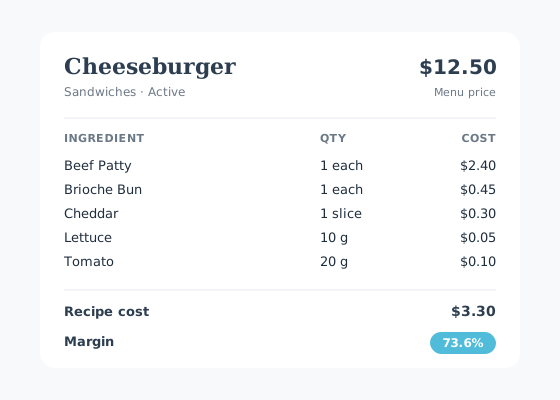
All the operations tools you need to run a profitable kitchen, without the bloat of a full ERP.
Recipe costs update automatically as ingredient prices change. See live margin per menu item.
Sales, modifiers, and refunds import nightly. Inventory deducts itself based on what was sold.
One-click backup and restore of every recipe and modifier so you never lose your operational knowledge.
Tag a Square discount as “Waste” and the items get counted against waste, not sales.
Daily email at the time you choose, listing what’s below reorder level and who supplies it.
Suggest from low stock, send to suppliers, receive partial deliveries, and watch costs roll into recipes.
Run a main location plus a couple of food trucks? Track inventory per POS — main location, truck 1, truck 2 — each with its own reorder threshold and low-stock alerts.
The same engine — Square sales, inventory, live margin — tuned to how your operation actually runs. Food businesses are home base; simple retail shops fit too.
You, if: lattes with size + milk options, a pastry case, and maybe a mobile cart on weekends.
You, if: you push hundreds of sandwiches and breakfast plates a day and 30¢ a plate is the difference.
You, if: multi-component dishes, station prep, and a chef who reworks the menu every season.
You, if: you cook out of a commissary and run service from a truck, a stall, or an event tent.
You, if: a small shop, café merch shelf, bakery jar wall, or coffee bag rack — a few dozen SKUs you buy and resell.
Not for: variant matrices (size × color), UPC scanning, vendor RMAs, or 1,000+ SKU catalogs. Pick a purpose-built retail POS for those.
Not a perfect fit? PlateMargin is built for small operators who buy stock and sell it — as ingredients turned into menu items, or as finished products on a shelf. If that's you, the free trial takes about an afternoon to set up.
Mocked with sample data — your real numbers replace these once Square is connected.
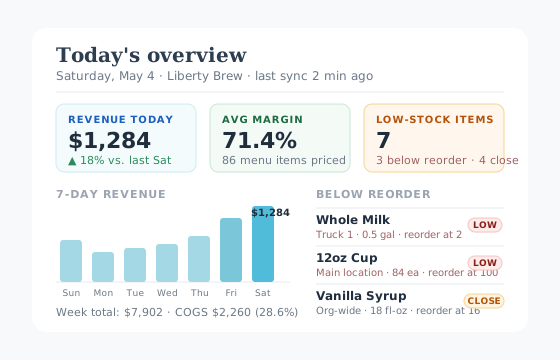
Open the app and the headline numbers are right there — today's revenue, your average margin, the week's trend, and which buckets are about to run dry. The same view your morning coffee is looking at.
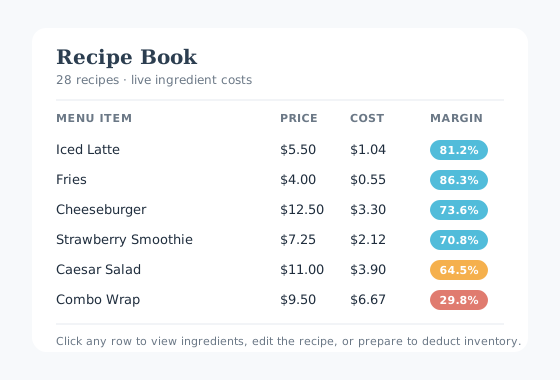
Every menu item, its recipe cost, and its margin in one scan. Color-coded high / mid / low so problem dishes jump out.
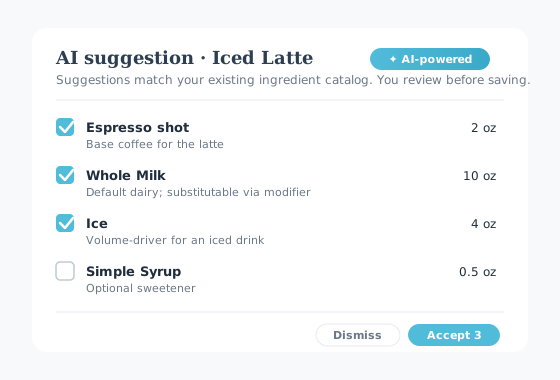
Stuck on a new menu item? AI proposes ingredients drawn from your existing catalog. You always review before saving.
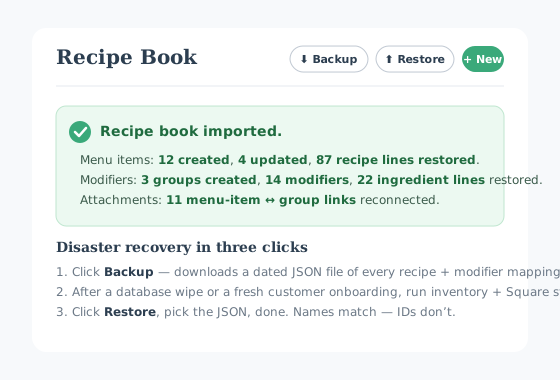
One-click JSON backup of every recipe, modifier, and ingredient mapping. After a wipe or fresh onboarding, Restore puts everything back.
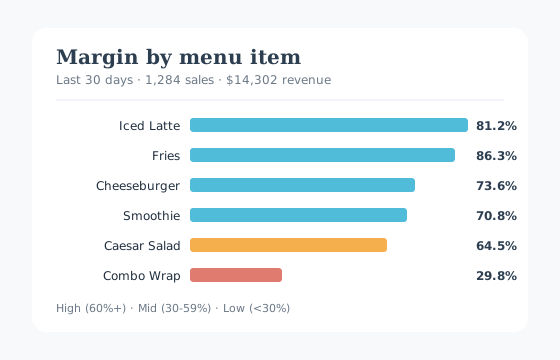
Sort by margin to see what’s carrying the kitchen and what’s costing you.
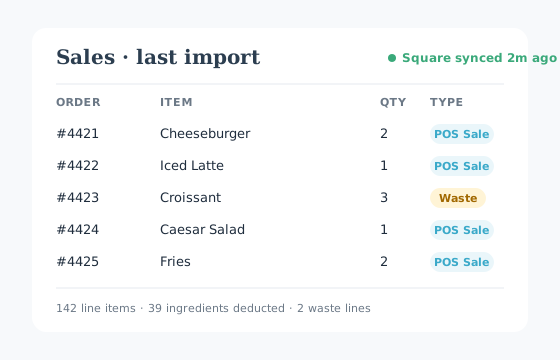
Square sales flow in nightly. Lines with a Waste discount get counted against waste, not revenue.
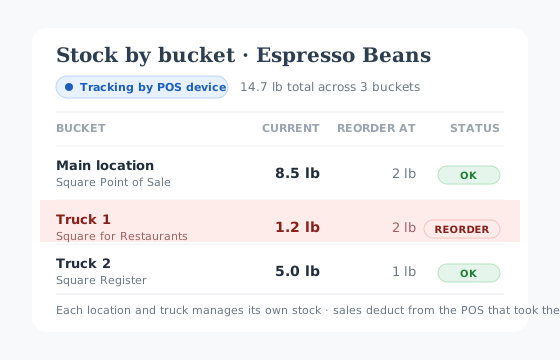
Main location, Truck 1, Truck 2 — one ingredient, separate stock counts per POS. Each one alerts independently the moment its bucket drops below reorder.
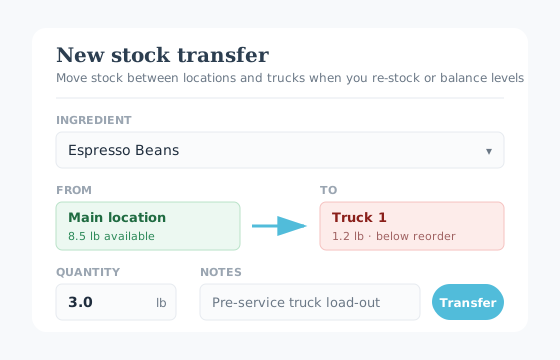
Loading the trucks before service? Log the transfer in seconds. Every move records who, when, and why so counts never drift from reality.
Connect Square once. Spend an afternoon mapping recipes. Then let it run.
Paste your Square access token in the admin portal. Locations, menu items, and modifiers sync automatically.
Tell PlateMargin what each menu item is made of. Optional AI suggestions speed this up.
Sales import on a schedule, inventory deducts from the right bucket per POS or location, and the dashboard shows what’s actually profitable.
Start with a free 15-day trial — no credit card required. Pick a plan when you’re ready.
Monthly
$99/mo
Yearly
$990/yr
≈ $82.50/mo — 2 months free vs. monthly
Already have an account? Sign in. Need something custom? Talk to us.
If something else is on your mind, drop us a note.
Square. We pull catalog items, sales, modifiers, payments, and devices via the Square API. Other POSs aren’t supported today.
About an afternoon. Connect Square, the catalog syncs automatically, and the bulk of the work is mapping recipes to menu items — AI suggestions speed that up.
Yes. Switch to per-Location or per-POS-device tracking and each gets its own stock buckets, reorder thresholds, low-stock alerts, and P&L.
$99/month or $990/year (about $82.50/month). No per-location, per-user, or per-transaction fees. 15-day free trial, no credit card required.
Yes. Cancel from inside the app — it takes effect at the end of your current billing period.
Simple retail — a few dozen SKUs, no variant matrices. Flip the org to Retail mode and every Square catalog item gets a 1:1 stock item auto-created on sync. Not for: variant matrices (size × color), UPC scanning, or vendor RMAs.
Microsoft Azure (United States), encrypted at rest. Sensitive credentials live in Azure Key Vault with field-level encryption. We don’t store payment cards — Stripe holds those directly. Full details in the Privacy Policy.
Multiple locations, an unusual POS, or want a guided concierge onboarding? We’ll get back to you within one business day.